Real Estate Agencies and Brokers

Your property portal ready to sell and rent.

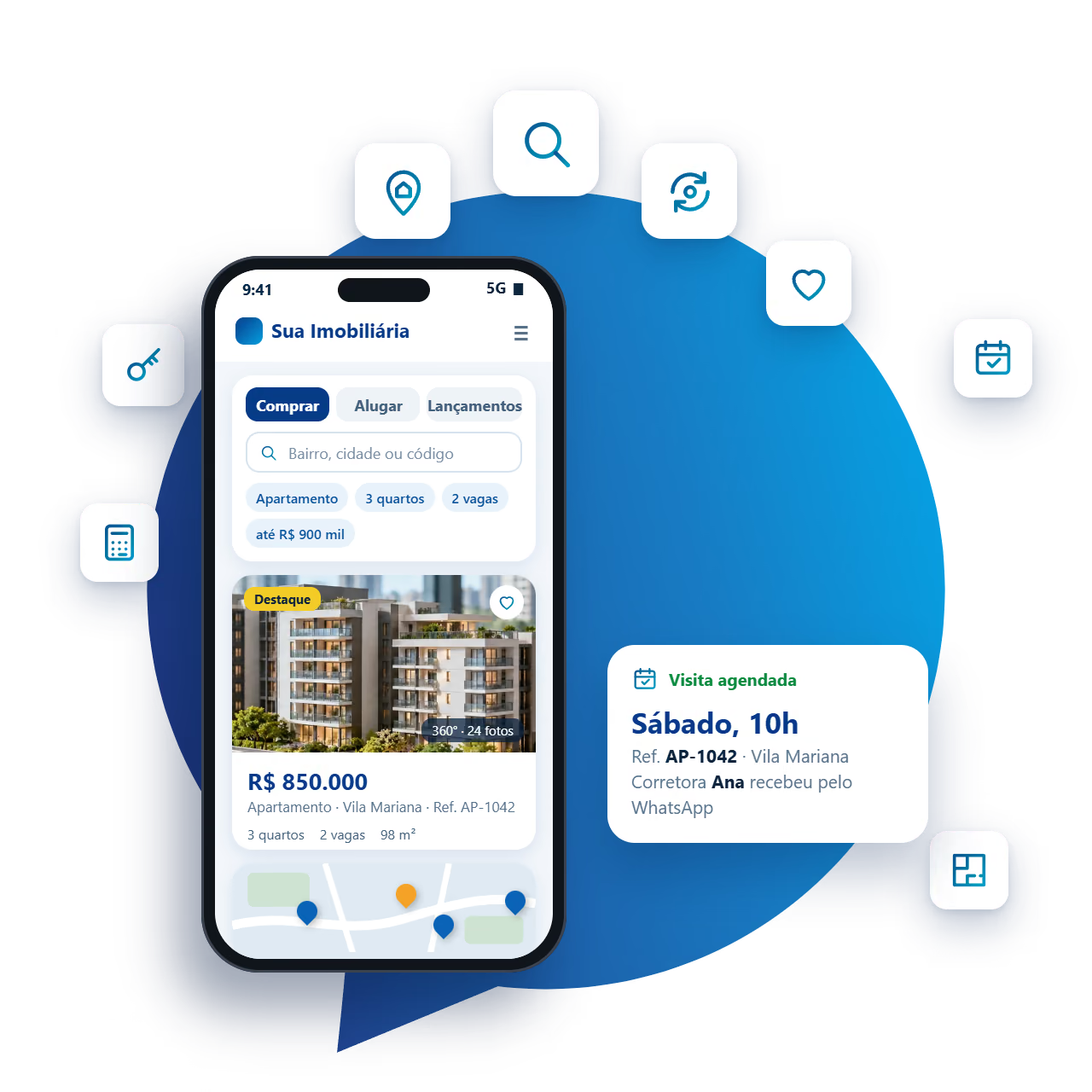
We build real estate portals with filter and map search, complete property listings and inquiries that reach the broker with the property of interest.

Explore the portal

Your idea. Our next conversation.

Built for those who sell and rent properties

A complete real estate portal that looks like your agency.

We develop real estate portals on WordPress with Houzez, one of the best-selling real estate themes in the world, with more than 57,000 licenses sold. It provides the foundation of a major portal: advanced search, maps, property listings, broker pages and a management dashboard.

Gerencie Web adapts everything to your operation: visual identity, neighborhoods and property types, sales, rentals and new developments, WhatsApp inquiries and team training to keep the portal up to date.

  • Filter and map search, just like the big portals
  • Complete listing with photos, video, 360° tour and floor plan
  • Inquiries and viewings with the property code
  • Management dashboard with brokers, CRM and charts

See the management dashboard
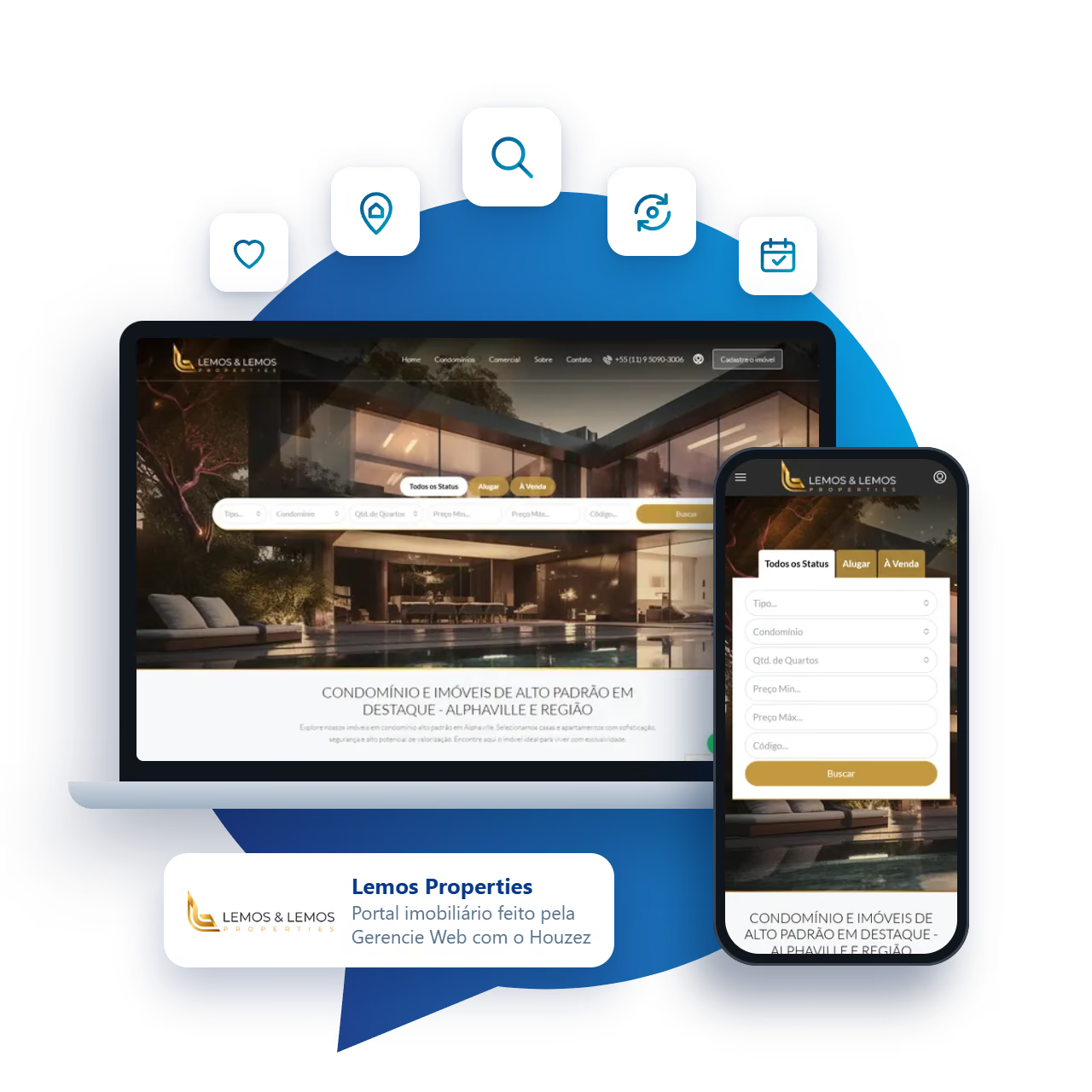
Lemos Properties portal screens on a laptop and a phone, with property search by type, gated community, bedrooms and price.
Lemos Properties portal, built by Gerencie Web with Houzez. Visit the website

Agency management

A dashboard to manage properties, brokers and deals.

Beyond the portal your clients see, the agency gets an internal dashboard: properties, brokers, contacts and deals in one place, with performance charts.

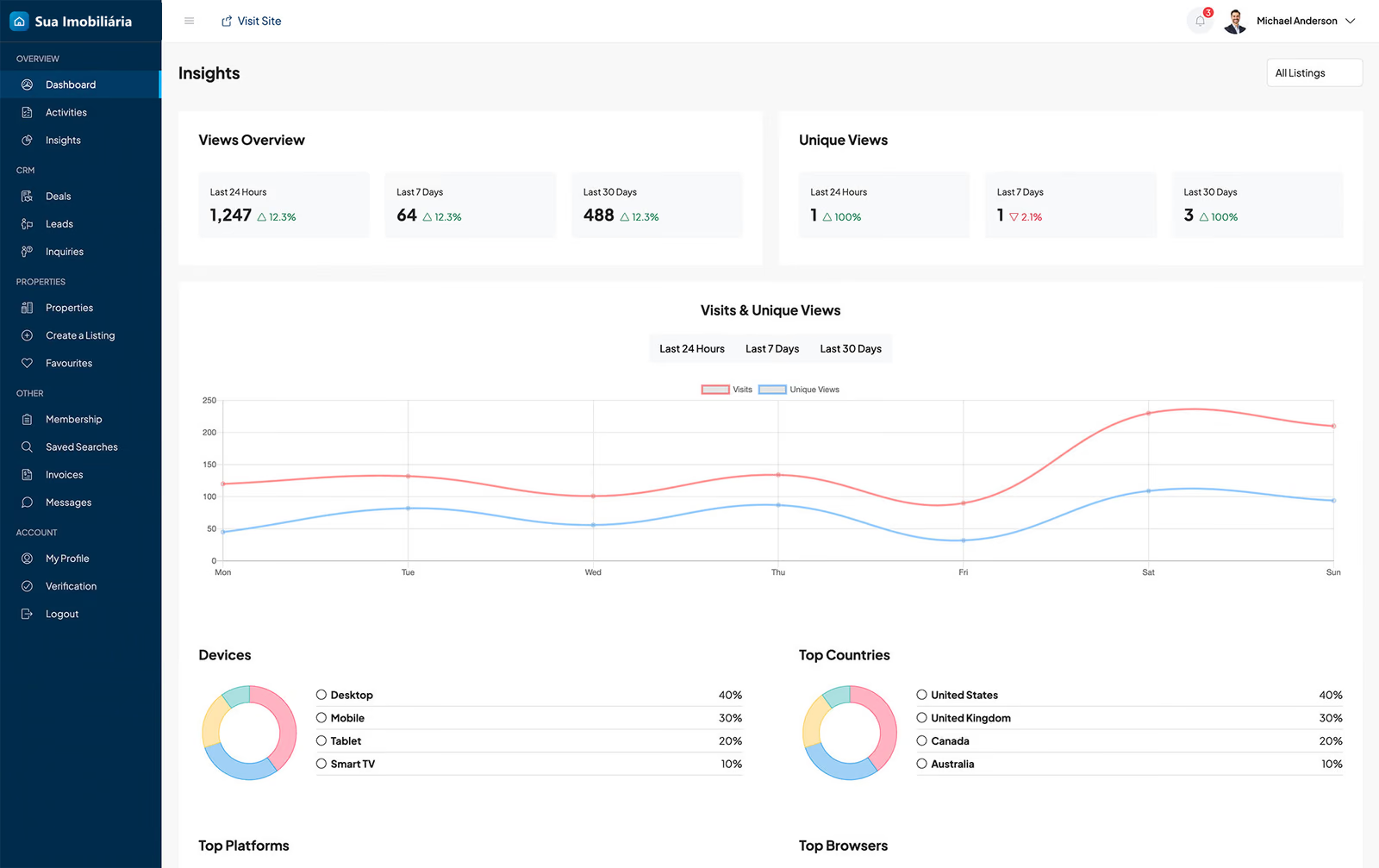
Statistics screen with a chart of visits and unique visitors, devices and countries.

Dashboard with performance charts

Track visits to each property and to the whole portal over the last 24 hours, 7 days or 30 days.

  • Visits and unique visitors in a chart
  • Devices, countries and traffic sources
  • Filter by property to see what attracts the most interest
View the screen in a larger size
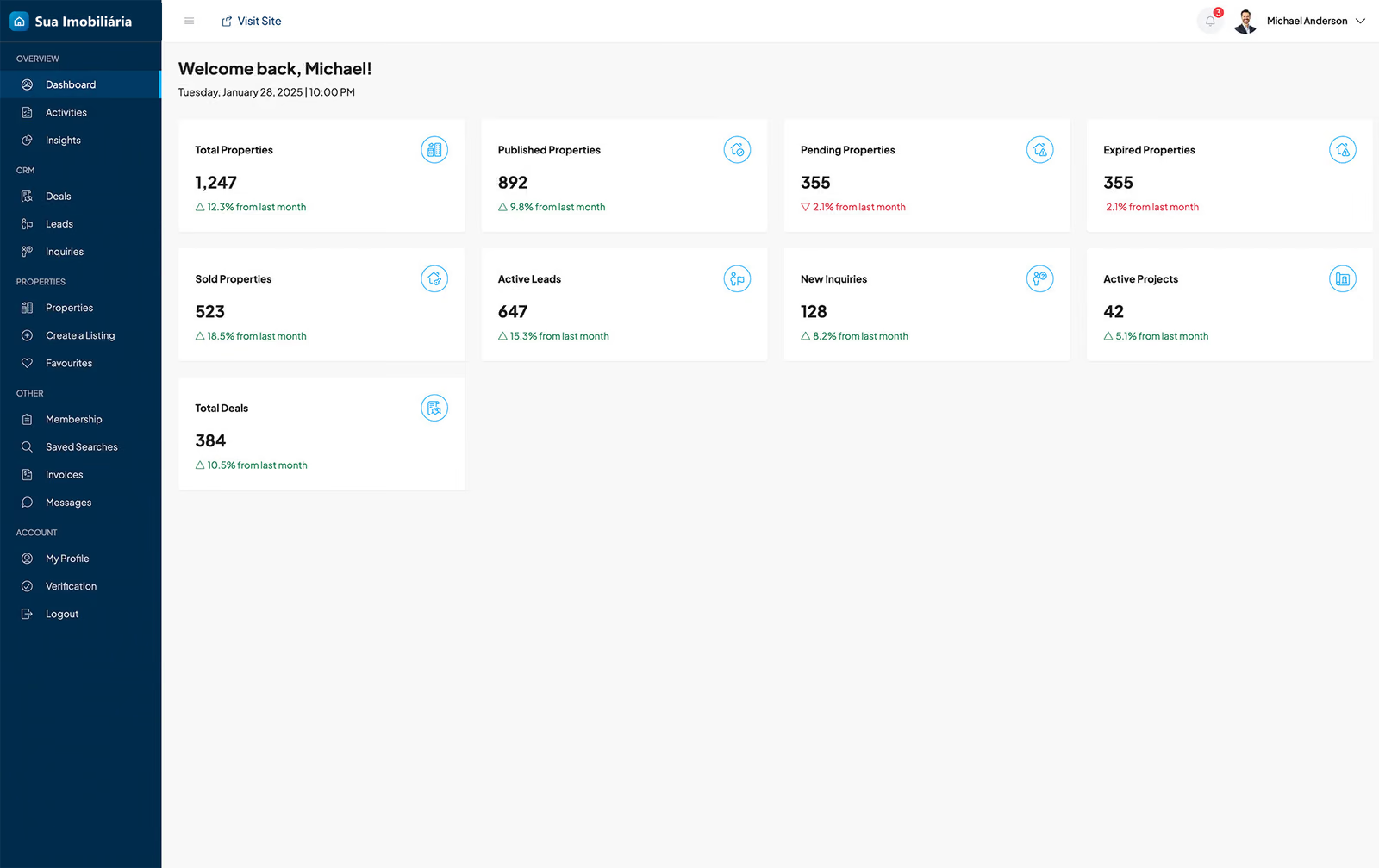
Agency dashboard with a summary of the month’s properties, contacts and deals.

Agency overview

As soon as they log in, the team sees the month’s summary: published, pending, sold and expired properties, active contacts and deals in progress.

  • Indicators with the month’s change
  • Shortcuts to properties, contacts and deals
  • Access by profile: agency, broker or owner
View the screen in a larger size
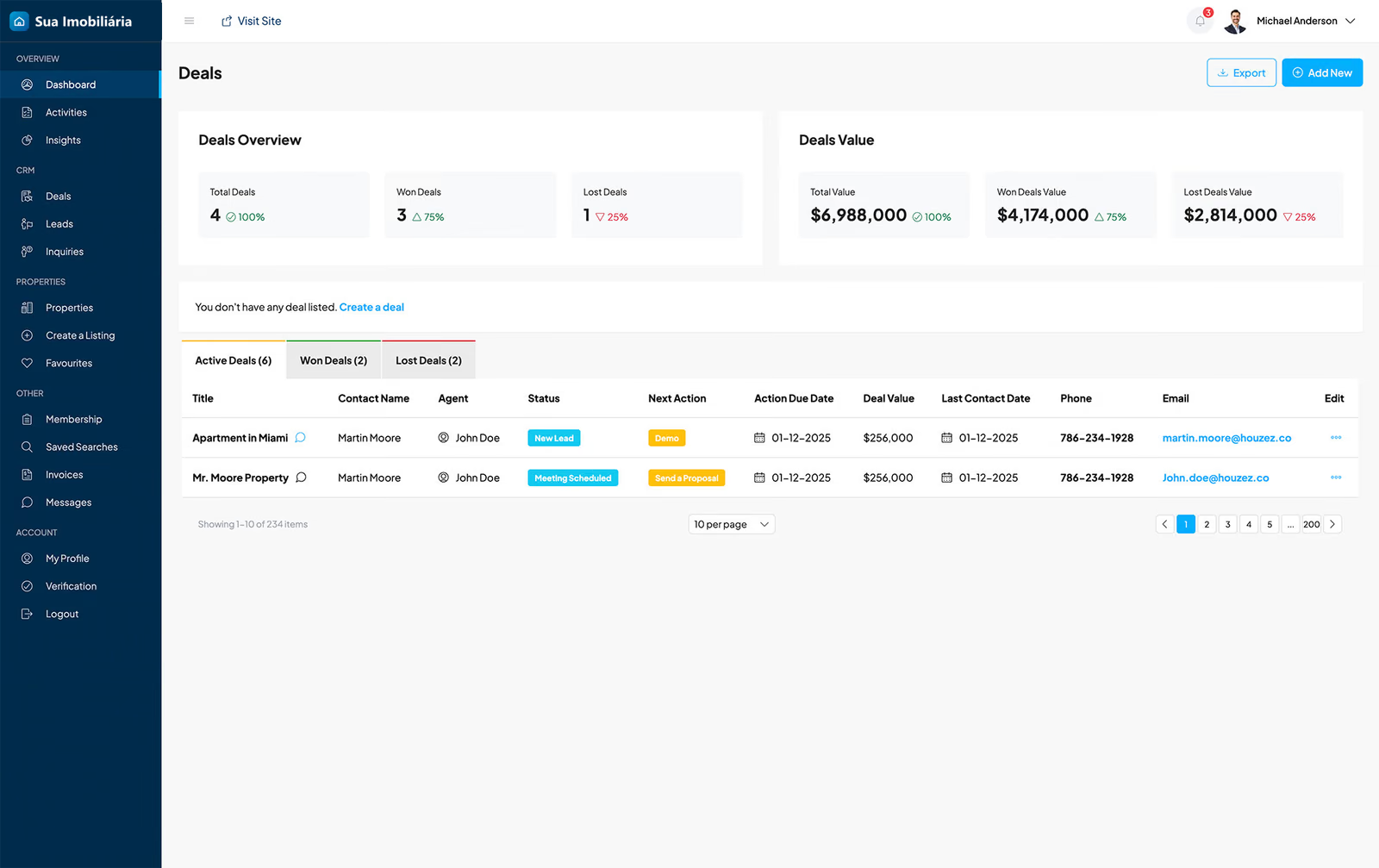
CRM deals screen with values, stages and the broker in charge.

Deals CRM

Each negotiation is recorded with the client, the broker, the stage, the next action and the value.

  • Active, won and lost deals
  • Total value under negotiation
  • Next action and date for each deal
View the screen in a larger size
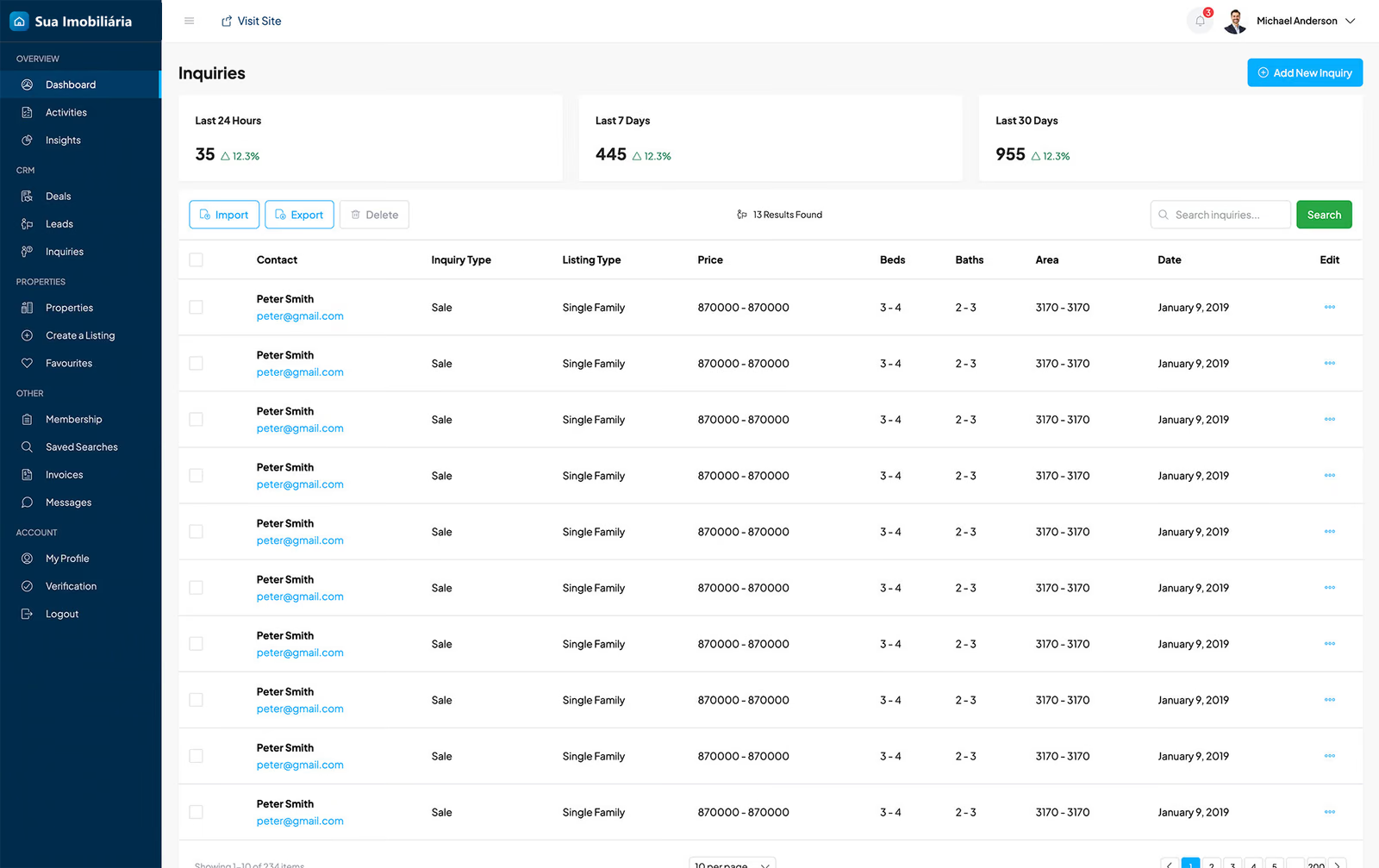
List of client inquiries with property type, price and bedrooms.

Contacts and inquiries

Requests that come in through the portal become organized contacts, with the property type, price range and number of bedrooms the client is looking for.

  • Inquiries with the profile of the property wanted
  • Activity history for each client
  • Search and filters to find any contact
View the screen in a larger size
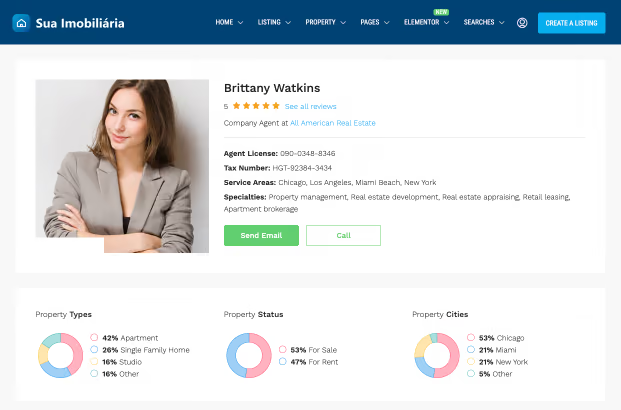
Broker page with reviews and charts by property type, status and city.

Your brokers

The agency adds brokers, assigns properties to them and tracks each one’s work.

  • Broker page with properties, contacts and reviews
  • Statistics by property type, status and city
  • Properties assigned to each broker
View the screen in a larger size
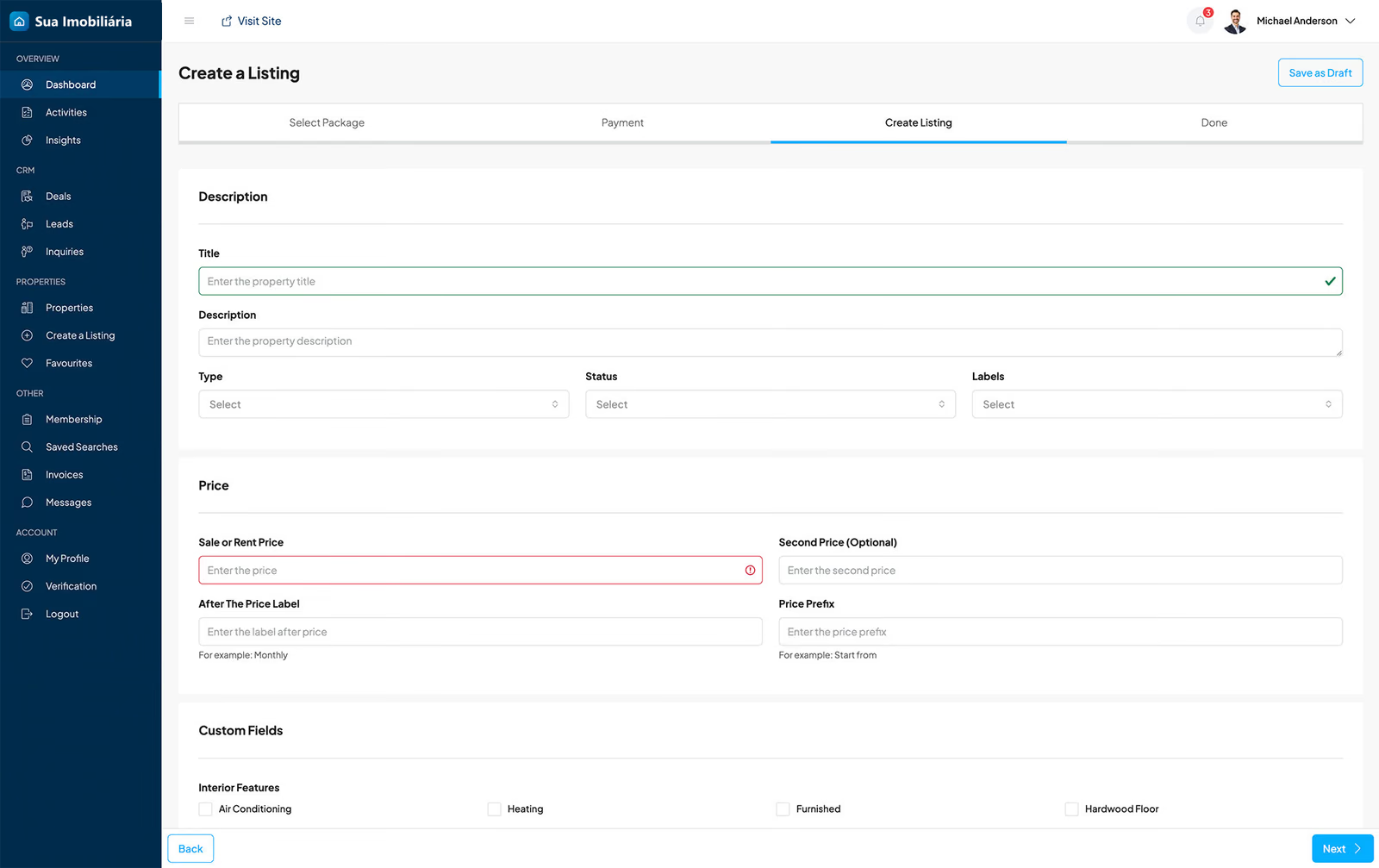
Step-by-step property entry form in the dashboard.

Adding properties

Brokers and owners add properties through the portal itself, step by step: description, prices, photos, location and features.

  • Custom fields for your market
  • Approval before publishing
  • Featured listings and plans for advertisers
View the screen in a larger size
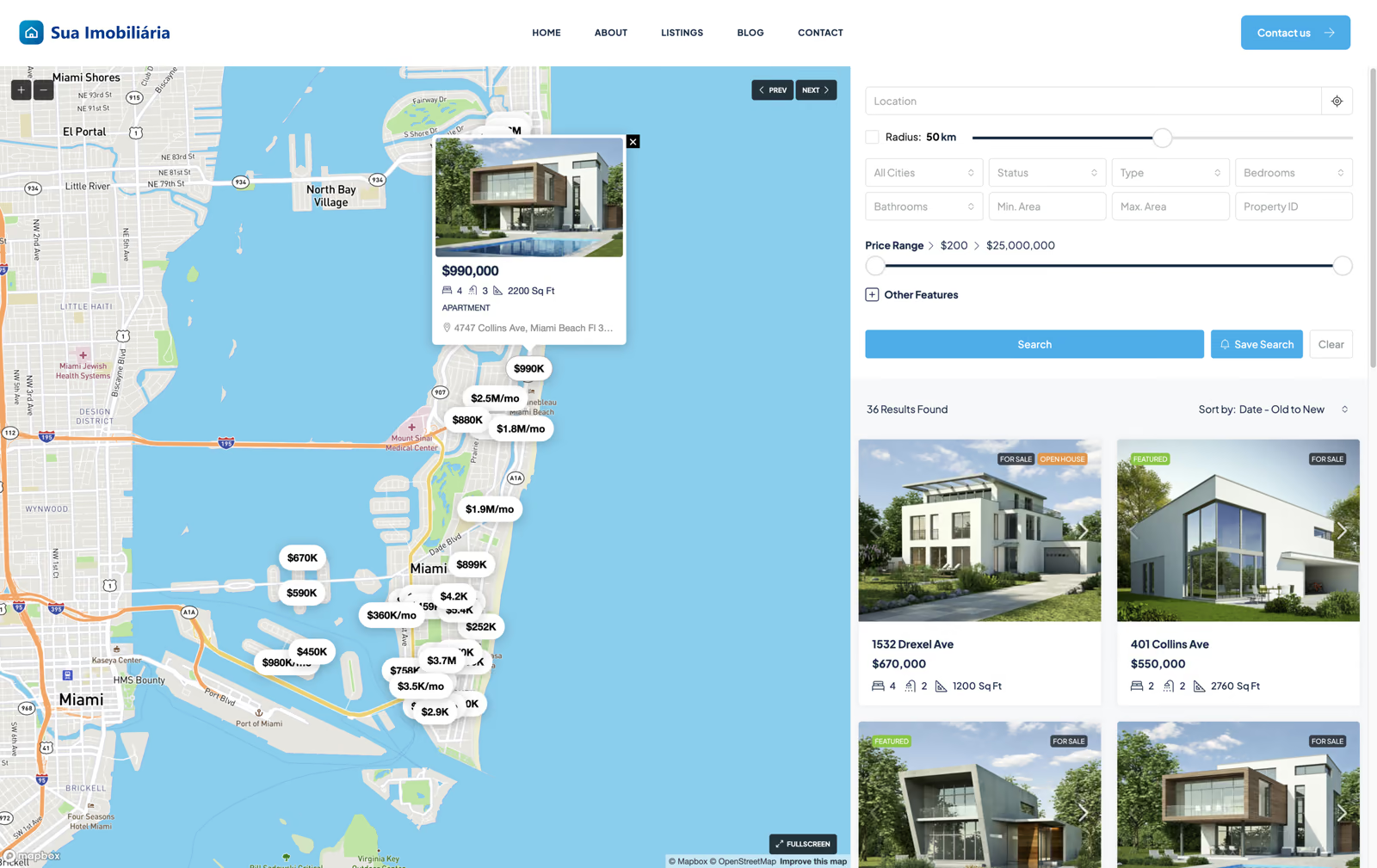
Property search with filters next to a map showing prices.

Filters and map for clients

On the portal, clients filter by city, status, type, bedrooms, bathrooms, area, price range and code, with radius search on the map.

  • Results side by side with the map
  • Saved searches with new property alerts
  • Prices on the map and property preview
View the screen in a larger size

Houzez demo screens (houzez.co), with the logo replaced by “Sua Imobiliária” (Your Agency). On your portal, the dashboard carries your agency’s brand and texts in your language.

See everything the portal does

SEO and mobile experience from the start

A foundation for being found.
An experience designed for mobile.

Search-ready structure and responsive navigation are part of the planning, development and delivery of your portal.

SEO for every property, neighborhood and type

Each property gets its own page, with an organized title, description and address. Neighborhood, city and property type pages help the portal show up in searches like “apartment for sale in Vila Mariana”.

  • Organized property, neighborhood and type pages
  • Sitemap, internal links and indexing rules
  • Optimized photos and structured property data

From filter to WhatsApp, on mobile

Property searches usually start on a phone. Filters, photos, map and contact with the broker are designed for the small screen.

  • Filters and map that are easy to use with your finger
  • Full-screen gallery, video and 360° tour
  • WhatsApp, calls and viewing requests in one tap

Sold or rented properties can stay on the portal with an updated status or make way for similar options, according to the agency’s rules.

See what the portal does

What the portal does

Everything a major real estate portal has, with your brand.

These are Houzez features that we configure according to your operation. Each project uses what makes sense for your property type and your team.

01

Search that finds the right property

Filters by purpose, type, neighborhood, price, bedrooms, parking spaces and area, with radius and code search. Visitors save their search and get new matching properties by email.

Website Design and Management
02

Map with properties in the area

Properties appear on the map with pins, a listing preview and nearby points of interest. The list can be shown in a grid or side by side with the map, like the big portals.

Website Design and Management
04

Viewings and inquiries tied to the property

Viewing requests, the contact form and the broker’s WhatsApp already include the property code. The broker knows which property the client is talking about from the very first message.

Website Design and Management
05

Manage your brokers

The agency adds brokers, assigns properties to them and tracks each one from the dashboard. Brokers and partner agencies have their own page, with properties, contacts and reviews.

Website Design and Management
06

Dashboard for your team and owners

Brokers add and update properties through the website itself, with role-based permissions. Owners can list properties with the agency’s approval, and a portal open to advertisers can sell plans with online payment.

Website Design and Management
07

Contact and deal CRM

Contacts, deals and activities are organized in the dashboard, along with the viewings and statistics of each property.

Website Design and Management
09

Import, integrations and languages

Properties can be imported by spreadsheet or XML when your system or portal provides that file. Integrations with CRMs and portals depend on a compatible interface. The portal can also offer other languages and currencies to serve investors.

Website Design and Management E-learning and Training Portals
See the client journey

The journey of someone looking for a property

From listing to booked viewing, without losing the client along the way.

People looking for a property compare many options. The portal helps them find quickly, decide with good information and talk to the right broker, with the property already in the message.

That’s what we did for Lemos Properties: gated communities and high-end properties in Alphaville, with search by type, community, bedrooms, price and code, plus WhatsApp service.

Explore AI applications
  1. Find

    Search by filters, map and property code.

  2. Decide

    Photos, 360° tour, floor plan and financing simulation.

  3. Talk

    Viewings and WhatsApp with the property of interest.

AI applied to your real estate agency

Fast service, even outside business hours.

We implement AI that checks the properties listed on the portal, answers questions and organizes viewing requests for the broker.

Team using artificial intelligence on a laptop to organize the company’s routine.
01

Conversational search

Find properties from phrases like “3 bedrooms near the subway up to R$ 900,000”.

02

Pre-screening and viewings

Answer questions about the property and organize the viewing request before it reaches the broker.

03

Listing descriptions

Draft descriptions and promotional copy from the property data.

The AI only uses information published and approved by the agency. Prices, offers, contracts and paperwork stay with the brokers.

Promote your properties

Presence, communication and growth

Ads by property, neighborhood and new development.

We plan campaigns and content that take visitors straight to the right property on the portal, not just to the home page.

Campaigns by property and development

Google and Meta ads linked to the properties and the up-to-date terms on the portal.

Social media and materials

Posts, videos and promotional materials for your properties with the agency’s identity.

Results by property

Inquiries, scheduled viewings and most-searched properties tracked in a report.

Strategy, campaign management and media budget are defined in the proposal, based on the services you hire.

See how we start

From conversation to your operation

Your project starts
with a good conversation.

You take part in every step.

Get your questions answered
  1. We plan the portal

    Map property types, neighborhoods, filters and team.

  2. We set up Houzez

    Build search, listings, maps and pages with your brand.

  3. We add the properties

    Import or add properties, photos and brokers.

  4. We prepare the team

    Train the team on listings, the CRM and customer service.

Shall we clear things up?

A good decision starts with no doubts.

Tell us how your agency works. The conversation starts where you are now.

Tell us your idea
What platform is the portal built on?

WordPress, with the Houzez theme and Elementor. The team uses the WordPress dashboard, in your language, to add and update properties.

Can I add and update properties myself?

Yes. Brokers add properties, photos and prices through the dashboard, and the team gets training at delivery.

Can I manage my brokers from the dashboard?

Yes. The agency adds brokers, assigns properties to them and tracks each one’s contacts and deals, without needing to access the WordPress admin.

Can I import the properties I already have?

We assess the format of your system or portal. Spreadsheets and XML files can be imported; automatic integrations depend on a compatible interface.

Does the inquiry arrive with the property of interest?

Yes. The contact form, viewing requests and WhatsApp send the property code to the broker.

Does it work for sales, rentals and new developments?

Yes. Purposes, property types, statuses and filters are configured according to your operation. Vacation rentals with online booking and payment require a separate feature.

Does it have a virtual tour and a mortgage calculator?

Yes. The property page supports 360° tours, video, floor plans and a mortgage calculator.

Shall we talk?
Gerencie Web — Digital Strategy

Your company deserves to be seen and remembered. We create websites, online stores and digital strategies to connect your brand with the right customers.

Tell us your idea and get a proposal designed for your business’s next step.

Talk to us

+55 (11) 96134-0091 comercial@gerencieweb.com.br gerencieweb.com.br

São Paulo — Brazil
Online service

Page animations
Gerencie Web support agent with a headset and laptop, ready to answer you.
Your idea starts
with a good conversation.

Let’s build it together

Tell us your idea!

Fill in the summary and choose how you prefer to start the conversation.

When you send by email, your request reaches our team and you get a confirmation. On WhatsApp, you review the message before sending. We use your data to respond to your request.

Protected by reCAPTCHA. The Google Privacy Policy and Terms of Service apply.